Table of Contents
Short answer: 90 days per lead, then permanent deletion. Meta’s own documentation on expired leads is unambiguous — lead information is available for 90 days from the time it’s submitted, after which it’s removed and cannot be downloaded. Not by you, not by Meta support, not through the API.
Everything else in this guide is what that one fact means for how you run lead ads.
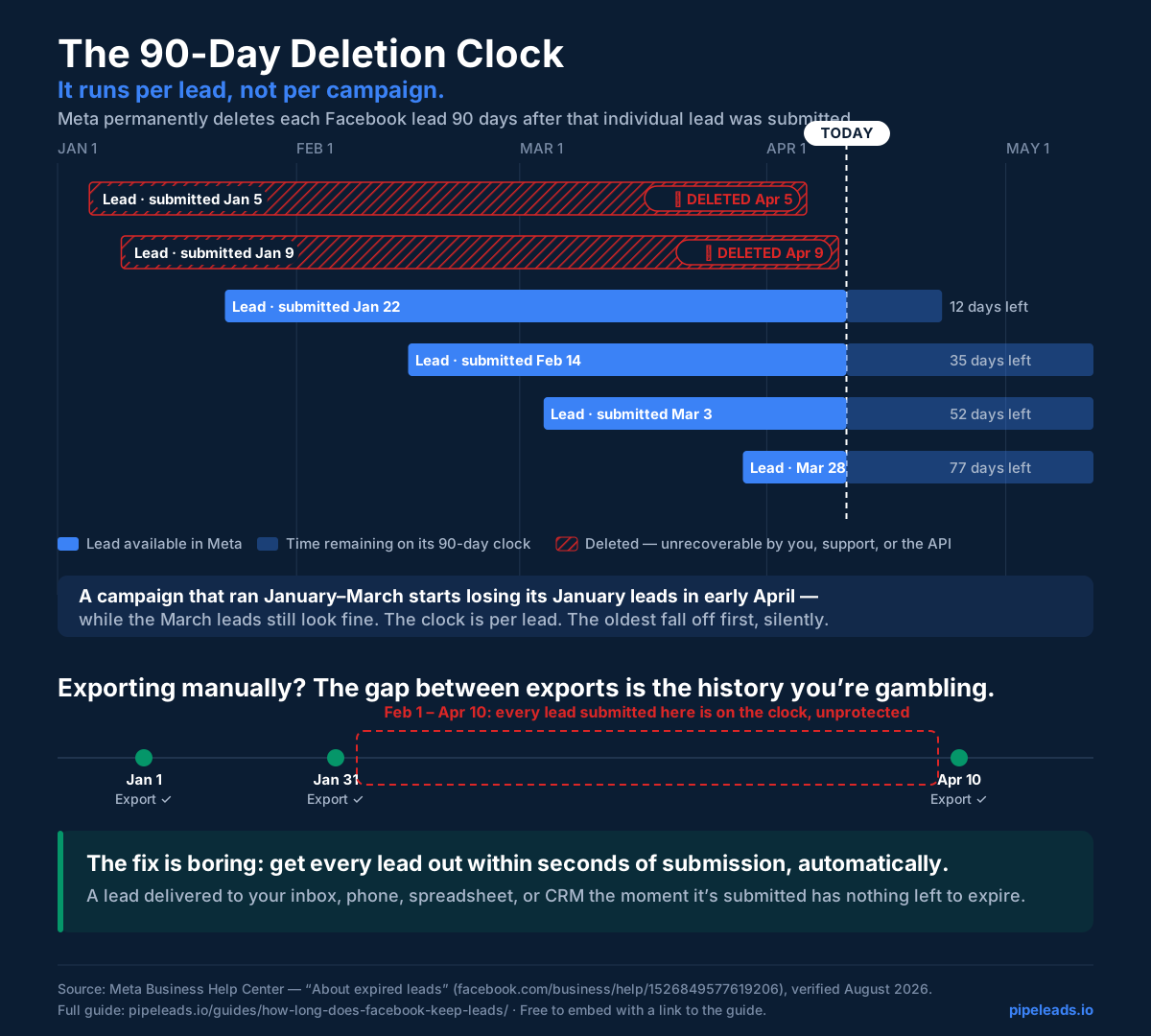
The Clock Is Per Lead, Not Per Campaign
The 90-day window starts at each individual submission. A campaign that ran January through March starts losing its January leads in early April while the March leads still look fine — so a “the export worked, we got leads” spot-check can pass while the back of your list is quietly falling off the conveyor. If you export manually, the interval between exports is the amount of history you’re gambling.
Who Actually Gets Burned
Three patterns account for most 90-day losses we hear about:
- The seasonal advertiser. Runs lead ads for spring, closes what closes, plans to “re-touch the list in the fall.” By fall, the list doesn’t exist. Long-cycle businesses — real estate, remodeling, legal — lose the most here, because their leads convert on 6–18 month timelines while Meta’s copy lives 3.
- The broken-integration victim. A Zapier zap or CRM sync died silently (usually an expired Meta authorization ) in week 2; nobody noticed until week 15. The leads from the gap were recoverable right up until they weren’t.
- The it’s-in-Leads-Center operator. Uses Leads Center as the CRM — owners, labels, stages, the works. All of that diligent pipeline management sits on data with a self-destruct timer.
Beat the 90-day clock permanently
PipeLeads delivers every lead into systems you own the moment it's submitted — Meta's deletion window stops mattering.
The Three-Step Plan
Step 1 — Export everything today. One CSV per form: Business Suite → All tools → Instant forms → Download by Date Range, set to the last 90 days. (All three export routes, with click-paths: the download guide .) This converts everything currently at risk into a copy you own. Import it into a spreadsheet and the archive problem is solved backward.
Step 2 — Automate delivery forward. Manual exports have the fatal property of depending on memory. Connect an automatic path so every future lead leaves Meta within seconds of submission — into your inbox , your phone , and your Google Sheet . Any of the methods compared in our guides work (CRM integration, DIY Zapier , or PipeLeads ); the requirement is just that the path is automatic and monitored, so a silent failure can’t reopen the gap.
Step 3 — Make your copy the system of record. Once delivery is automatic, your spreadsheet or CRM holds the permanent, growing history — with your status columns, notes, and follow-up dates attached — and Meta’s 90-day window becomes trivia instead of risk. Your long-cycle leads survive to the month they’re actually ready to buy.
Use This Graphic
The deletion-clock infographic above is free to use in your own article, deck, or internal training — copy the snippet below, which embeds the always-current version with attribution:
<a href="https://pipeleads.io/guides/how-long-does-facebook-keep-leads/">
  <img src="https://pipeleads.io/images/infographics/90-day-deletion-clock.svg"
       alt="Meta deletes each Facebook lead 90 days after submission — per lead, not per campaign"
       width="1200" style="max-width:100%;height:auto"></a>
<p>Infographic: <a href="https://pipeleads.io/guides/how-long-does-facebook-keep-leads/">How long does Facebook keep leads? — PipeLeads</a></p>
The Uncomfortable Math
A concrete version, since this policy’s cost hides easily: at a $12 cost per lead and 150 leads a quarter, letting one quarter’s list expire destroys $1,800 of purchased contact data — much of it from people who will buy eventually, just not this month. The prevention is a one-time export plus a $15/month delivery pipe . The 90-day rule only hurts businesses that treat Meta as storage; treat it as a doorway and the rule never touches you again.