Table of Contents
Here’s the scenario that fills advertiser forums, in its purest form: you run Meta Lead Ads, you have the Business Suite app installed, and your phone dutifully buzzes when someone messages your Page — but when someone actually submits your Instant Form, nothing. You find the lead hours later, sitting in Leads Center , already cold.
This isn’t a settings problem you’ve failed to find. It’s how the platform behaves, and this guide covers every real fix: the one quasi-native workaround, proper push notifications (we recommend Pushover, and we’ll show you why), SMS, and email — with the delays and maintenance costs of each stated honestly.
Why Your Phone Stays Silent
Meta’s mobile apps reliably push Messenger events. Instant Form submissions are a different pipeline: for many advertisers those alerts arrive 15 minutes to several hours late, inconsistently, or never — with iOS reliability a running complaint — and they’re app-only, buried among every other notification Meta generates. Nothing in Business Suite sends the lead to your email natively, and nothing texts you. (The full native-notification autopsy, and the roles/permissions issues that compound it. )
Nothing in Meta’s public direction suggests this is about to improve. Plan around it.
The One Quasi-Native Trick: the Messenger Toggle
There is exactly one way to get a genuinely instant, genuinely free, Meta-native push — and it’s a side effect, not a feature. When building or editing your Instant Form, enable the option to start a conversation on Messenger after submission. Leads who tap into that conversation open a thread with your Page — and that fires Messenger’s push notification, instantly, with the lead’s name attached.
The honest catch: it only covers leads who opt into the conversation. Some do, many don’t, and you get no alert for the ones who don’t — so it’s a partial net, not a system. Enable it anyway (a Messenger thread with a hot lead is valuable in itself); just don’t mistake it for coverage.
First, Understand What “Instant” Actually Means
Before picking a tool, know the mechanics, because “real-time” marketing copy hides a real distinction:
- Webhook-driven delivery reacts the moment Meta emits the lead event — seconds.
- Polling checks for new leads on a schedule — the notification arrives whenever the next check runs.
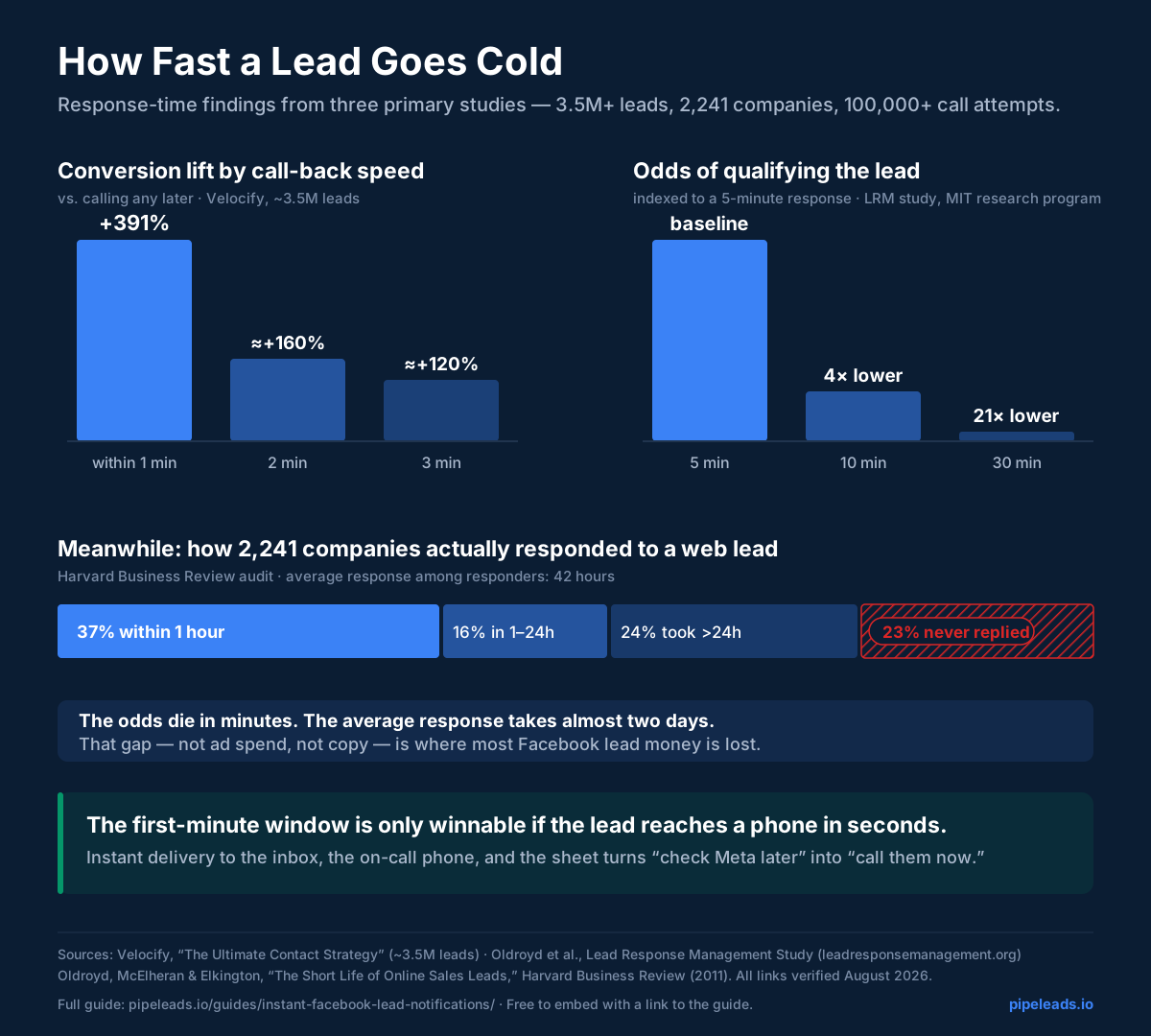
Free and entry tiers mostly poll: Zapier’s cheaper tiers check on roughly 15-minute intervals (instant triggers for premium apps like Facebook Lead Ads require paid plans), Make’s free tier runs on a 5–15 minute schedule, and IFTTT’s free tier polls hourly. Against the response-time math — a 391% conversion lift for contact inside the first minute, a 21× qualification drop between minutes 5 and 30 — a 15-minute polling delay quietly deletes most of the value you set the alert up for.
Want instant without assembling it?
PipeLeads is webhook-driven end to end: lead submitted → your phone and inbox, in seconds, with per-lead delivery proof. $15/month.
Route 1: Real Push Notifications — via Pushover
Meta won’t push, but your phone still can. The clean DIY recipe is an automation platform in front of a dedicated push service, and our recommendation for the push half is Pushover : it’s built for exactly this, costs a one-time ~$5 per platform (no subscription), and does the things lead alerts actually need — high-priority alerts that can break through silent mode, quiet hours for the ones that shouldn’t, per-device routing, and message history. (Zapier’s own guides tend to suggest Pushbullet; Pushover’s priority system and one-time pricing make it the better lead-alert tool in our experience — we use it in our own internal tooling.)
The recipe: automation platform (Zapier or Make) → trigger Facebook Lead Ads: New Lead → action Pushover: Send Notification, mapping the lead’s name, phone, and key answer into the message, with priority set high. Budget realities: the Facebook trigger needs a paid automation tier for instant (webhook) delivery — on free tiers your “push notification” inherits the polling delay above, which defeats the purpose.
What you now own: the connection between the automation platform and Meta (the classic silent-expiry failure), the mapping, and one more service in the chain — per form, if you run several. It works; it’s just yours to keep working.
Route 2: SMS — the Push Notification That Needs No App
For most teams, a text message beats an app push: it works on every phone including the flip phone in the truck, it can’t be uninstalled in a notification purge, and carrier stats consistently show ~98% of texts opened, most within minutes. A lead SMS with a tap-to-call number is the workflow for field businesses.
DIY version: the same automation recipe with an SMS action — Zapier’s built-in SMS action is US/UK only, so elsewhere you’re wiring Twilio or ClickSend, which means another account, per-message fees, and sender-registration hoops.
Built-in version: SMS is a first-class PipeLeads destination — up to 3 verified numbers per form, key fields plus a link to the full lead, 250 segments included, hard caps against surprise costs. How the SMS delivery works.
(Team-visibility variant: if the alert should land where your whole team can see and claim it, that’s the Slack pattern — covered in its own guide , including the message format that keeps a lead channel from getting muted.)
Route 3: Email — Instant, With Fine Print
Email alerts are table stakes, and the DIY fine print is covered in depth in our email notifications guide . The short version for the instant-notification angle: a Gmail-based zap works; Zapier’s own “Email by Zapier” action caps at 10 emails per hour (a real ceiling on a good ad day); and the same polling-vs-webhook tier question applies. PipeLeads sends the complete lead to up to 5 verified inboxes in seconds as standard.
Use This Graphic
The response-time infographic above is free to use in your own article, deck, or sales training — copy the snippet below, which embeds the always-current version with attribution:
<a href="https://pipeleads.io/guides/instant-facebook-lead-notifications/">
  <img src="https://pipeleads.io/images/infographics/speed-to-lead-decay.svg"
       alt="How fast a lead goes cold — response-time findings from Velocify, the LRM study, and Harvard Business Review"
       width="1200" style="max-width:100%;height:auto"></a>
<p>Infographic: <a href="https://pipeleads.io/guides/instant-facebook-lead-notifications/">Instant Facebook lead notifications — PipeLeads</a></p>
The Part Nobody Mentions: Webhooks Fail
Every instant-notification method above — including ours — ultimately rides on Meta emitting a webhook event. Webhooks occasionally don’t fire: platform hiccups, outages, subscription glitches. A webhook-only automation has no answer for this; the lead simply sits in Meta, unannounced, until a human stumbles onto it.
The resilient pattern is webhook + reconciliation: react instantly to events, and periodically sweep Meta’s API for leads the webhook missed. PipeLeads runs this reconciliation automatically as part of the delivery core — a missed event becomes a late notification instead of a silent never — and every lead still gets its per-lead delivered/retrying/failed record. If you build DIY instead, at minimum put a weekly “check Leads Center against the sheet” reminder on the calendar; here’s what silent gaps look like when nobody does.
The Multiplication Problem (Read This Before Building)
Here’s the cost of the DIY routes that never shows up in the tutorials: every channel × every form is its own thing. Push for the owner, email for the office, SMS for the on-call phone, across three lead forms — that’s up to nine separate automations, each with its own field mapping, its own connection that can silently expire, and its own place to update when anything changes. When the office email changes, you edit it everywhere it appears. When you add a form, you rebuild the stack for it.
PipeLeads inverts that shape: one Meta connection, and destinations managed in one place. New team member needs the leads? Add a verified email — done, every form. Email address changed? Change it once. Want a new Google Sheet? Point the destination at it. We don’t offer unlimited destinations — the plan’s limits are published plainly — but the ones you have are managed centrally, and when Meta changes an API version or moves a menu, maintaining the integration underneath is our job, not yours. You service the leads; we service the plumbing.
Bottom Line
- Free and now: enable the Messenger toggle on your form — real push, partial coverage. Do it regardless.
- DIY push: Zapier/Make → Pushover (one-time ~$5, priorities, quiet hours) — on a paid automation tier, or your “instant” is a 15-minute poll.
- The no-app answer: SMS. DIY it with Twilio if you enjoy plumbing, or it’s built into PipeLeads .
- Want all three channels, one connection, maintained for you? Start the trial — your next lead hits your phone and inbox in seconds, and you can prove it did.